
The short answer
Webflow is the better choice when designers need to build and maintain a marketing site without developers. Sanity with Astro is the better choice when you want to deliver content in a structured, multilingual and maintainable way over the long term, and you have a development team.
At WAGEMUT we know both sides. As a Webflow partner, we build and maintain numerous client sites in Webflow. Our own website, on the other hand, we moved from Webflow with Weglot to Astro with Sanity, including a Claude Code integration. That was a deliberate trial run: we wanted to check whether the stack works for our clients before offering it. This article is not a sales pitch for either side but an honest assessment from a developer's perspective. Prices and limits are as of October 2026.
What Webflow does really well
Webflow is not a site builder in the Wix sense. You work with real CSS: classes, flexbox, grid, breakpoints. If you think cleanly, you get clean output. For designers who want to work close to the code, it is a powerful tool.
On top of that, hosting, SSL and CDN are included. There is no deployment, no build server and no dependencies that go stale. You click Publish, done.
Webflow has also caught up on the CMS side. With the pricing change in May 2026, the old CMS and Business plans were replaced by the Premium plan. It comes with 20,000 CMS items and 40 collections, from 25 US dollars a month billed annually. Previously the CMS plan offered 2,000 items and 20 collections. For most marketing sites, that is now more than enough.
Multilingual sites now work natively through Webflow Localization, including automatic hreflang tags. The add-on starts at 9 US dollars per language per month. There is also a word allowance: 10,000 words a month on the smaller tier, 50,000 on the larger one for 29 US dollars. If you run a multilingual blog, do the maths beforehand.
And Webflow has its own MCP server for AI agents, too. So AI alone is no argument against Webflow. There is one limitation, though. Webflow's AEO agents, which give recommendations for visibility in AI answers, are only available in the Team plan from 2,500 US dollars a month on an annual contract. The MCP server helps you build, not get found.
Where Webflow hits its limits
The problems rarely show on day one. They come when the site grows.
Costs on several levels. Webflow bills site plan, workspace plan, seats and add-ons separately. Since May 2026, bandwidth has also become a much bigger cost factor. The price on the pricing page is rarely what ends up on the invoice.
Structural CMS limits. The item count is not the problem, the queries are. Outside Enterprise, nested collection lists are limited to two per page with ten entries each. If you have relational content, you quickly end up with client-side JavaScript workarounds. Content is also tightly coupled to pages. If you want to use the same content in an app, a newsletter or another frontend, it gets awkward.
Lock-in. Webflow can export code. But exactly the dynamic parts are missing from the export: CMS content, forms, search and localisation. A real migration is always a rebuild.
No developer workflow. There are backups, but no branches, no pull requests, no code reviews. Custom code lives in embeds with a limit of 50,000 characters per field.
Weglot and the word model. Before Localization existed, Weglot was the standard for multilingual Webflow sites. Weglot bills by translated words, and the allowance is fixed. Every new blog post eats into the budget. The translations also live on Weglot's servers and are delivered through their infrastructure. Cancel, and they are gone without a manual export.
What Sanity with Astro does better
The core of the difference: in Webflow, content is part of the page. In Sanity, it is structured data you can deliver anywhere.
Content as data. In Sanity you define your content model as a TypeScript schema in the repository. You query content with GROQ, with arbitrary references and nesting. Limits like “two nested lists per page” do not exist. The schema goes through the same reviews as the rest of the code.
Performance through Astro. Astro renders HTML without JavaScript by default. Interactive components are loaded selectively as islands. That feeds directly into Core Web Vitals and therefore SEO. You decide per page whether it is built statically or rendered on the server.
Future-proofing. Cloudflare acquired the Astro team in January 2026 and committed to keeping Astro open source. An interesting detail: according to Cloudflare, Astro already powers platforms like Webflow and Wix. So you are betting on the same technology, just without the platform on top.
Multilingual without a word counter. In Sanity, translations are simply part of the data model, at field or document level. No proxy, no script, no word limit. You control hreflang and language URLs in Astro yourself.
Fair entry costs. Sanity's free plan includes 20 seats and 10,000 documents. The Growth plan costs 15 US dollars per seat per month, and read-only access is free. Astro itself costs nothing, and you choose the hosting freely.
The honest downsides of Sanity and Astro
Anyone selling you a headless stack without a catch is lying.
Nothing works without developers. Every new section means a schema plus a component. Your designer cannot just click together a new layout. A well-designed kit of sections softens this, but never removes it entirely.
More moving parts. Hosting, build pipeline, webhooks for rebuilds, preview and visual editing: you have to set all of that up and maintain it yourself. In Webflow it is simply there.
Higher upfront effort. For a business-card site with five subpages, it is rarely worth it. Costs shift from licence fees to development hours.
Not every site needs a CMS. For a simple site whose content rarely changes, Astro alone is enough. The texts then live as Markdown or directly in the components in the repository. Astro builds static HTML from them that you can host on any web server, with no database and no running CMS costs. Sanity only comes in when editors need to maintain content without a developer.
Editors work differently. Editors fill in forms instead of typing directly on the page. Visual editing largely closes this gap, but it has to be set up properly.
There are limits here too. The free plan blocks requests when a quota is reached instead of simply carrying on. For production client sites, keep that in mind.
Our trial run and the role of Claude Code
We did not leave Webflow because Webflow is bad. We used our own site as a test bed. The questions behind it: how much effort is the stack in daily use? Can the editorial team handle it? And does it pay off for client projects? Our conclusion: for the right projects, yes. That is why we now offer Sanity with Astro alongside Webflow.
The biggest lever in daily work, however, is the AI integration. Since December 2025, Sanity has offered a hosted MCP server with OAuth login. Through it, Claude Code can work directly with your Sanity project: read schemas, deploy schemas, create documents and query content. Add to that the Agent Toolkit with a Claude Code plugin. It brings skills for Sanity best practices, content modelling, and SEO and AEO.
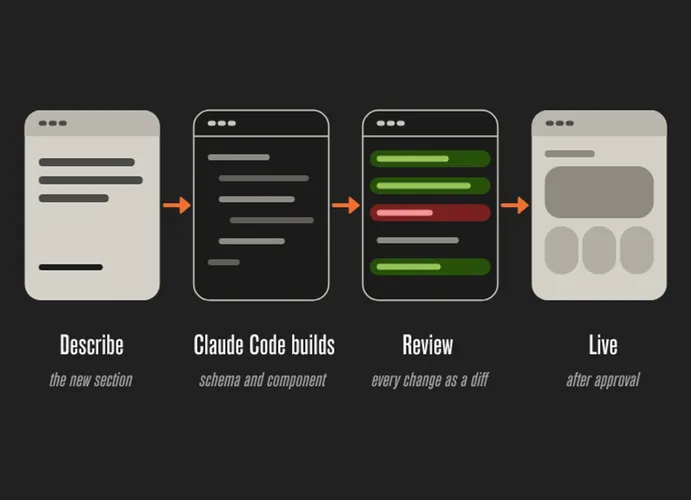
In practice, that means: you describe a new section, and Claude Code creates the schema, GROQ query and Astro component. Because everything lives in the repository, you see every change as a diff and review it before it goes live. That is exactly the difference to Webflow. Webflow has an MCP server too, but the changes land in a visual tool without versioning in the developer sense.
A note from practice: let the AI produce drafts, but do not publish them unchecked. Sanity cleanly separates drafts from published documents. Use that.
Webflow or Sanity with Astro: the decision guide
- Who builds. Webflow: designers, visually. Sanity + Astro: developers, in code.
- Getting started. Webflow: fast, everything included. Sanity + Astro: more setup, more control.
- CMS. Webflow: up to 20,000 items, fixed query limits. Sanity + Astro: freely modelled, relational queries.
- Multilingual. Webflow: add-on per language or Weglot. Sanity + Astro: part of the data model.
- Performance. Webflow: good, platform-dependent. Sanity + Astro: very good, no JavaScript by default.
- Lock-in. Webflow: high, export without CMS data. Sanity + Astro: low, open source and exportable.
- Versioning. Webflow: backups. Sanity + Astro: Git, branches, reviews.
- AI workflow. Webflow: MCP in the visual tool. Sanity + Astro: MCP plus code in the repo.
Choose Webflow if a design team should maintain the site independently and there is no developer in-house. Choose Sanity with Astro if content grows, is multilingual or needs to run across several channels. And for a lean site that is rarely updated, Astro without a CMS on your own server is enough.
Webflow, Sanity or WordPress after all? We will advise you honestly
We are not tied to one system. As a Webflow partner, we build and maintain Webflow sites. How far that goes in Webflow is shown by our work for a Japanese precision machine tool manufacturer. For projects with growing, multilingual or cross-channel content, we build Sanity with Astro. And sometimes WordPress is the better choice, for instance if your team already knows it or you depend on specific plugins. Which system fits is something we decide together with you, based on your content, your team and your budget. Get in touch for a no-obligation first call.
Sources
- Webflow Pricing
- BRIX Templates: Webflow pricing changes May 2026
- BRIX Templates: Webflow limitations
- Rapid Developers: Webflow CMS limits 2026
- Pravin Kumar: Webflow Localization vs. Weglot
- SimpleLocalize: Weglot pricing model
- Flow Ninja: Sanity pricing 2026
- Sanity Docs: MCP server
- Sanity Changelog: MCP server GA
- Sanity Docs: Agent Toolkit
- Cloudflare: acquisition of Astro