In the last article we focused primarily on Weglot. Let's start by picking up the basics again and recalling the essentials. You can find the link here: LINK
What does Webflow do?
Webflow is a professional site builder for static websites – the key word being "static". Using its builder, Webflow generates solid, robust, finished HTML websites that are then served from Webflow's servers.
What does Weglot do?
When a translation is requested, the content of your page is sent to Weglot's servers, translated, and the translated text is sent back to your browser, where it replaces the German content. In other words, your content is modified by Weglot.
Webflow on the rise: an era of multilingual sites begins
For a long time the demand for built-in multilingual support sat at the top of the Webflow community's wish list like an unfulfilled dream. But towards the end of 2023 that dream finally came true: under the banner "Webflow Localization", Webflow introduced a long-awaited feature.
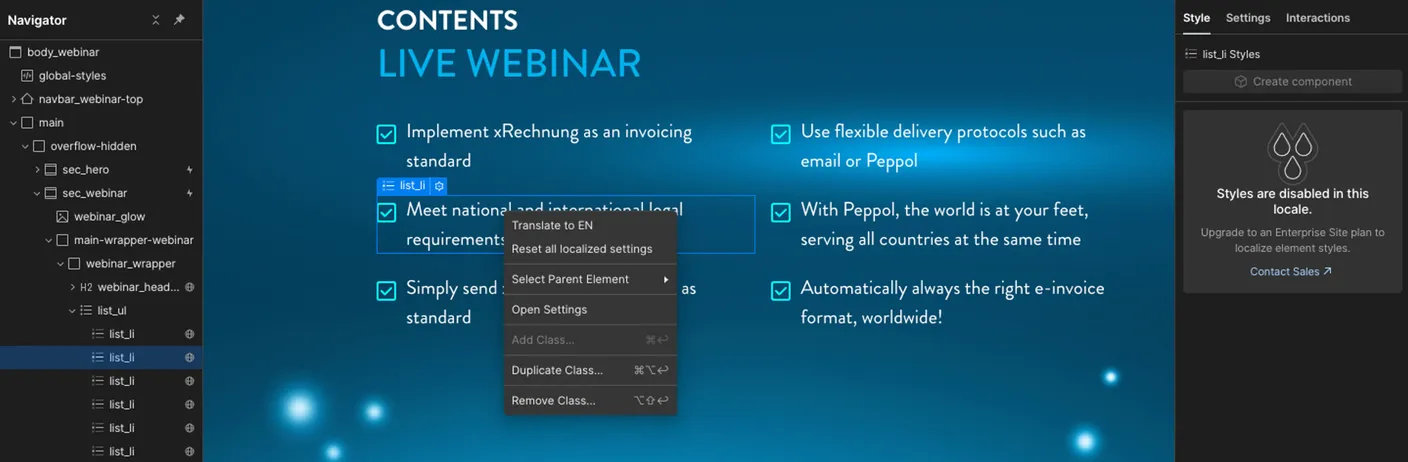
In typical Webflow fashion, multilingual support was integrated so that you do not have to change the way you work. Handling stays intuitive and user-friendly. You define your content on the Webflow interface as usual. When it comes to translation, you simply switch the language within the platform and use the translation AI to localise your content. With a simple right-click you can have individual passages or entire pages translated automatically. This process does have to be carried out once per page until all your content is translated.
But why is that?
Just as with the original language, Webflow also creates static HTML files with the translated content. So your site exists once in German and once in, say, English. Especially from an SEO perspective this is a clear plus, because all the meta information is directly readable by search engines. The translated pages then live in a system of subfolders, e.g. www.wagemut.studio/en/. This is also the most common pattern for multilingual websites.
A special plus: since you translate the content directly in the Webflow interface, you keep full control over the quality of the translations, even if they are generated automatically. Images and other non-text content are not yet translated automatically, but it is only a matter of time until Webflow provides a solution for that too. With this step, Webflow has not only listened to its community but also paves the way for an even more global presence of Webflow sites on the internet.
The downsides
Webflow's biggest downside at the moment is the handling of translations. While the direct integration brings many advantages, it is also a direct disadvantage: currently translations can only be edited via Designer access, which makes collaboration with other translators or colleagues harder or more expensive, because additional seats have to be booked. Integration into the Editor would be desirable here.
Further disadvantages: images can only be translated or swapped in a higher plan, and the same applies to automatic redirects based on the browser's language settings.
The verdict
Although Webflow's disadvantages do not sound great, translating with Webflow can still make sense. Especially when many pages are needed in several languages, there is an extensive blog with lots of text, or the content changes only sporadically, Webflow Localization is a good approach.
Weglot, on the other hand, is worthwhile when the website does not get too big and the content changes a little more frequently. Then Weglot takes care of the translation automatically, without you having to do anything.
This is also down to the pricing of both services. In the smallest plan, Webflow costs 9 USD per language and offers translation of 50,000 words per month. Only the words that are to be translated count, no matter how many words your website has.
Weglot costs 15 € per month for 10,000 words, but all words on your site count. To translate up to 50,000 words you already pay 29 € per month. On top of that there is a page view limit you should keep an eye on (even though it is generous).
What does wagemut do about localization?
At the moment we still use Weglot and so far we are very happy with the results. But in the future we will make the leap from Weglot to Webflow, because our website fits the Webflow pattern exactly:
- We edit our site entirely ourselves
- The site keeps growing through blog posts and case studies
- The lion's share of the content does not change (blog, case studies etc.)
So before we fall into the "Advanced Plan" at a cost of 3,000 €, we switch to Webflow Localization and face a bill of 108 USD, or 348 USD with a few extras in the Webflow Advanced Plan.